World’s Top Cross-Platform AI facial Recognition Engine
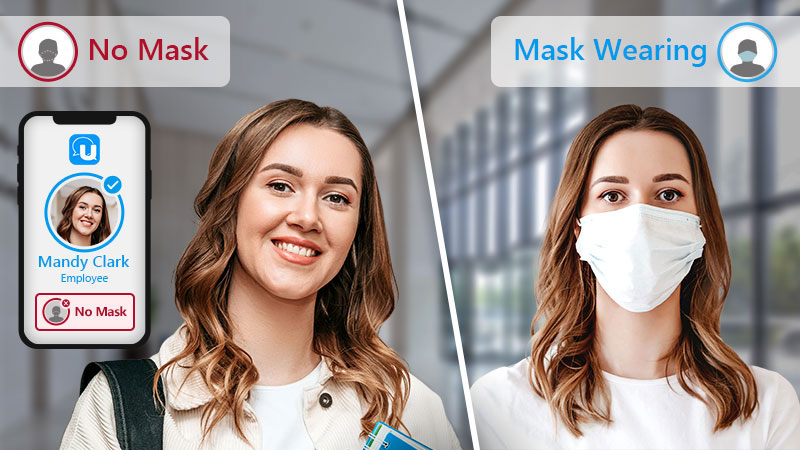
Mask Detection
FaceMeR Al technology can identify individuals who are not wearing a mask, where it is a requirement. The feature is so accurate it can also detect if a mask isn’t properly covering someone’s nose and mouth. A real-time notification can be sent with U Alerts whenever someone is not complying.
Facial Recognition with Masks
FaceMeR’s update algorithm provides the ability to accurately recognize a person’s identity, even if they are wearing a mask. It enables instantaneous and hygienic touchless biometric recognition
FaceMe® Security Key Features
FaceMe® Security
Workstation
Face Detection
Face Recognition
Face Matching
Video Hardware Acceleration
FaceMe® Security Workstation
Web Console
IP Cam & Workstation Config
Face Management & Visitor History
U Messenger API
FaceMe® Security
HTTP API
Notification API
Enrollment API
Face Recognition API
Database Purge API
QNAP QVR Face
Smart Facial Recognition System
Simply install the QVR Face solution on a QNAP NAS to analyze RTSP video streams from IP cameras, USB cameras or video recordings saved on a NAS. Facial recognition and video analytics are performed on the NAS, making it easier and more cost-effective to build a facial recognition system.
Real-Time Facial Recognition and Analytics
QVR Face is a smart facial recognition solution featuring real-time live streaming video analytics from connected cameras. You can use video analytics to set profiles, groups, and event notifications for instant facial recognition. Third-party partners can use the QNAP API to leverage data from QVR Face to build intelligent door access systems, member identification systems, or smart digital signage for applications including automatic door access management, attendance management, and smart retail services.
Attendance Management
Use facial recognition for attendance management to reduce clock-in and clock-out time during rush hours.
Set VIP groups and notifications. When high-level managers are identified, the system will automatically send out alerts.
Event reports are generated and enable event screenshot reviews.
Smart Retail
Set VIP groups and notifications. When an important person or regular customer visits, the system will send notifications to remind you about welcome preparations.
Integrate QVR Face with digital signage solution to provide tailored promotion information based on age and gender.
Retailers can group and rank unregistered faces, or register them as regular profiles for further market promotion. Create customized sales strategies by further integrating flow statistics, POS sales records and heat map data.
Door Access Management
Replace key or ID card-based door access systems with facial recognition technology by integrating QVR Face with door access systems.
Set a stranger list or blacklist. When a person on the list is nearby, the security guard will be alerted to take immediate action, thus securing the safety of the premises.
Find and play all the videos of unexpected visitors with the Face Search feature.
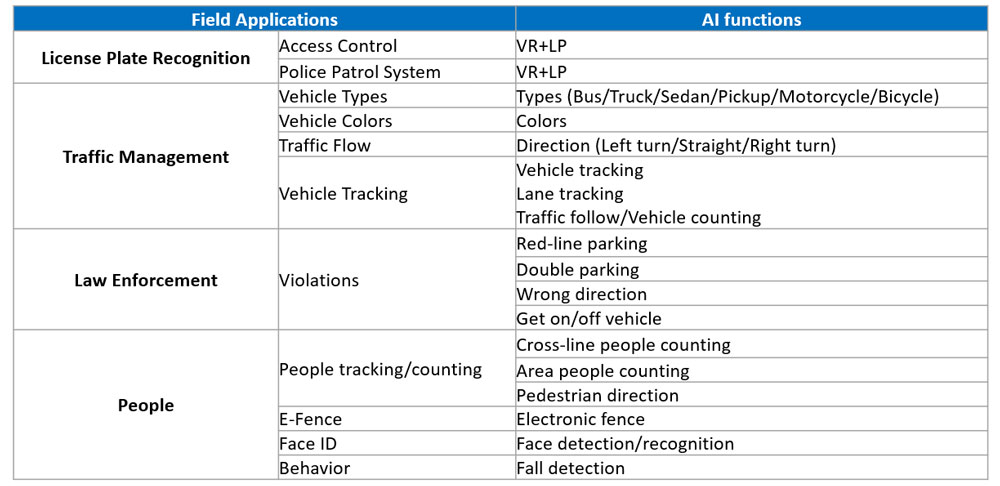
Alpha-VRS Smart City Solutions
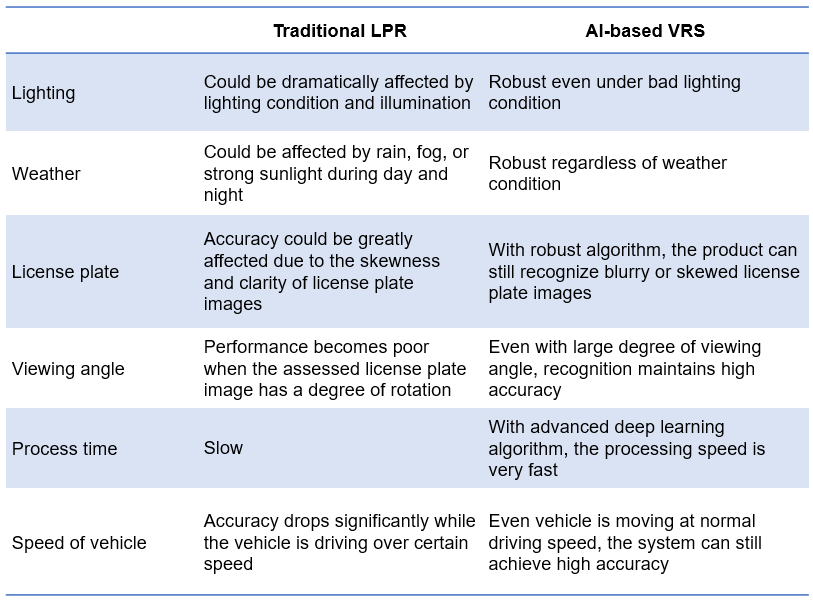
Vehicle Recognition System Comparison
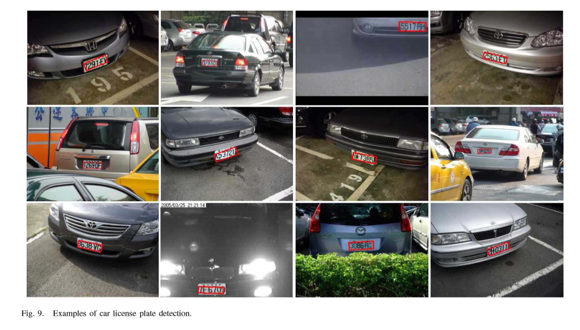
Alpha-VRS AI Vehicle Recognition System (LPR/Type/Color)
Fixed Camera
Moving Camera
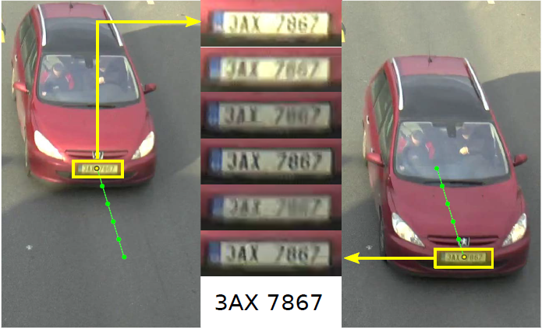
Vehicle Tracking/Counting
Night Time
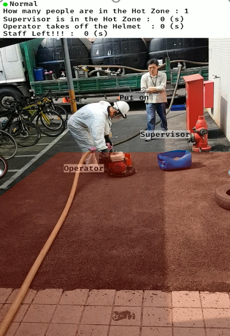
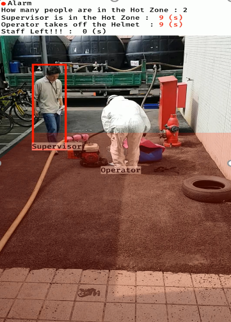
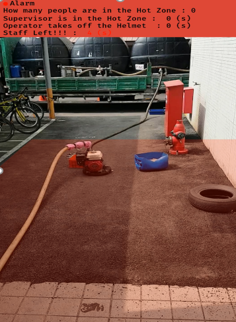
AI Detection for Operational Violation
Operators are required to put on the suit in the working area. The one without protection is the supervisor.
Supervisors are not allowed to enter the hot zone. Alarm triggered if there are violations.
The operator will need to put on helmet in the hot zone. If not, alarm triggered.
There must be at least one person in the working area during operation; Again, any violation will trigger the alarm.
Building Automation AI Video Analytics of Access Violation
p: normal behavior
o: climb over the gate
b: go under the gate
f: follow the other person
cc: swipe-in from the other side of the gate
oc: swipe-in by the other person
SMART AI Application at Factory and Production Line
Production Line SOP – Testing Example
p: normal behavior
o: climb over the gate
b: go under the gate
f: follow the other person
cc: swipe-in from the other side of the gate
oc: swipe-in by the other person
Hazard Detection
Cargo Oversize Detection
Hazard Detection
Unattended Object Detection
AI Application for People Tracking / Counting
Fall Detection
F:Fall / S:Still /Ft:Faint
Suspicious Behavior Detection
An adult male will be considered as a suspect if he wonders in front of female restroom for a certain period of time.
YELLOW if the suspect stays in the area longer than 5 secs but less than 10 secs.
RED if the suspect stays in the area longer than 10 secs.